---
title: How to Deploy a HTML, PHP, CSS website
description: "1. Login to INCONTROL dashboard. 2. From the Dashboard – Scroll down to System Info & Files and open File Manager. 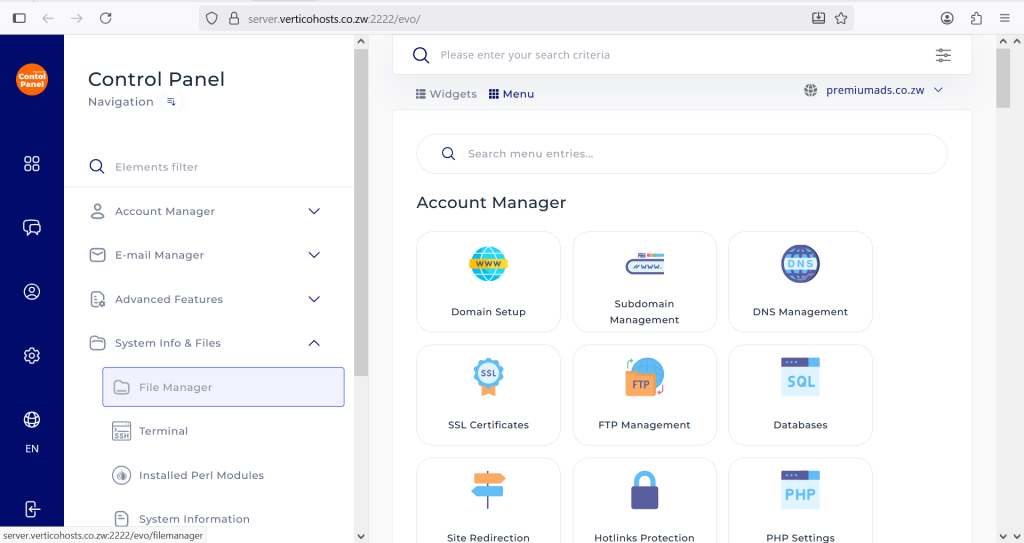 1. Under Quick Navigation find and open a folder named: **domains** - Click the domain name that you…"
url: "https://vertico.co.zw/docs/how-to-upload-a-website-manually/"
updated: "2025-10-07"
category: Installation
---
# How to Deploy a HTML, PHP, CSS website
1. Login to INCONTROL dashboard.
2. From the Dashboard – Scroll down to System Info & Files and open File Manager.

1. Under Quick Navigation find and open a folder named: **domains**
- Click the domain name that you want to upload the website to; eg. premiumads.co.zw
- Open the public_html folder.
- Click the + sign on your far-left side, **DRAG & DROP** or**CLICK TO UPLOAD** the zip file that contains your website
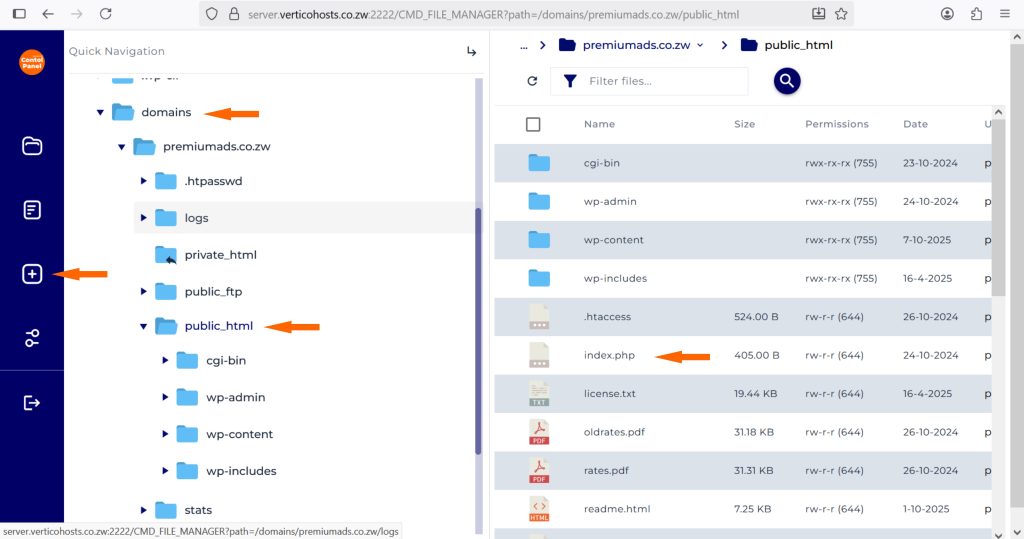
1. Extract the website files into the **public_html** folder (Make sure the**index.html** or **index.php**file of your website is moved to **public_html** not into any other folder).
2. That’s it, your website will be up and running.