Skip to content
Vertico Solutions Private Limited
  • Domains
  • Web & Email HostingExpand
    • Web & Email Hosting
    • Personalized Emails
    • Web Hosting & Maintenance
    • Reseller Hosting
    • Cloud HostingExpand
      • Linux VPS
      • Storage
  • Web Development
  • Online MarketingExpand
    • Social Media Marketing
    • Social Media Management
    • Search Engine Optimization
  • AboutExpand
    • Company Overview
    • Customer Reviews
    • Terms & Conditions
    • Fair Use Policy (FUP) for Hosting Services
    • Privacy Policy
  • ResourcesExpand
    • Documentation / Knowledge Base
    • Frequently Asked Questions
    • Tips & Updates
  • Support
Account Login →
Vertico Solutions Private Limited

How can we help you?

We have important docs to help you with our services.

Configurations

4
  • SSL Certificates (https:// or Secure Site)
  • Adding an Email Signature on Webmail
  • Adding an Email Signature on Outlook Desktop
  • DNS Records Management

Getting Started

18
  • Account Login
  • Creating Personalized Emails
  • Quick Email Access via Webmail
  • How to navigate the Billing system.
  • Changing Email Password
  • Domain Name Search
  • How To Make Payments
  • Accessing Control Panel
  • Creating Your Vertico Account
  • Logging in to the Vertico Client Area
  • Understanding the Client Dashboard
  • How to Update Your Profile
  • How Billing Works at Vertico
  • How to View and Pay an Invoice
  • How to Renew Your Services
  • How to Access DirectAdmin
  • How to Access Webmail
  • How to Open a Support Ticket

Installation

4
  • WordPress Installation
  • How to deploy a python app
  • How to Deploy a Nodejs App
  • How to Deploy a HTML, PHP, CSS website

Setup Process

6
  • Outlook Setup for Windows
  • Email Setup on Outlook Mobile
  • Email Setup on a IOS Device
  • Email Setup on Gmail mobile app
  • Basic Troubleshooting for Gmail
  • How to Troubleshoot Outlook

Business Guides

8
  • What Is Web Hosting?
  • What Is a Domain Name?
  • Why Should a Business Use Professional Email?
  • Shared Hosting vs VPS Hosting
  • How to Choose the Right Hosting Package
  • Website vs Social Media Page: Why Businesses Need Both
  • Why a .co.zw Domain Can Help a Zimbabwean Business
  • What Is Local SEO and Why Does It Matter?

Developers

10
  • How to Deploy an HTML, CSS and JavaScript Website
  • How to Deploy a PHP Website
  • How to Deploy a Node.js Application
  • How to Deploy a Python Application
  • How to Deploy a Laravel Application
  • How to Deploy a Django Application
  • How to Use Composer on Hosting
  • How to Use Environment Variables Safely
  • How to Deploy with Git
  • How to Read Application Logs

Domains

14
  • How to Register a .co.zw Domain
  • How to Register a .org.zw Domain
  • How to Register a .ac.zw Domain
  • How to Transfer a Domain to Vertico
  • How to Renew a Domain Name
  • What Happens When a Domain Expires?
  • What Are Nameservers and How Do They Work?
  • How to Change Domain Nameservers
  • What Is DNS Propagation?
  • How to Manage DNS Records
  • How to Point a Domain to a Website
  • How to Update Domain Registrant Information
  • How to Choose the Right Domain Extension
  • How to Protect Your Domain Name

Email

18
  • How to Set Up Email in Outlook for Windows
  • How to Set Up Email on Outlook Mobile
  • How to Set Up Email on an iPhone or iPad
  • How to Set Up Email in the Gmail Mobile App
  • How to Set Up Email in Mozilla Thunderbird
  • How to Add an Email Signature in Webmail
  • How to Add an Email Signature in Outlook
  • How to Create an Email Forwarder
  • How to Create an Email Autoresponder
  • How to Create Email Filters
  • How to Enable and Configure Spam Protection
  • How to Whitelist or Blacklist an Email Address
  • Why Are My Emails Going to Spam?
  • What Are SPF, DKIM and DMARC?
  • How to Manage Email Storage and Quotas
  • How to Secure a Business Email Account
  • Basic Troubleshooting for Gmail Mobile Email Setup
  • How to Troubleshoot Outlook Send and Receive Problems

Hosting

18
  • How to Upload a Website Using DirectAdmin File Manager
  • How to Upload a Website Using FTP
  • How to Create and Manage FTP Accounts
  • How to Create a MySQL Database and User
  • How to Import a MySQL Database
  • How to Export and Back Up a MySQL Database
  • How to Change the PHP Version
  • How to Change PHP Settings
  • How to Create a Cron Job
  • How to Enable a Free SSL Certificate
  • How to Force HTTPS on a Website
  • How to Create and Restore Hosting Backups
  • How to Check Disk Space and Bandwidth Usage
  • How to View Website Error Logs
  • How to Create a Subdomain
  • How to Add an Additional Domain to Hosting
  • How to Password-Protect a Website Directory
  • How to Set Correct File and Folder Permissions

Troubleshooting

10
  • Website Not Loading: Basic Troubleshooting
  • How to Fix a 404 Not Found Error
  • How to Troubleshoot a 500 Internal Server Error
  • How to Fix a 403 Forbidden Error
  • How to Troubleshoot SSL Certificate Errors
  • Email Not Sending: Troubleshooting Guide
  • Email Not Receiving: Troubleshooting Guide
  • Why Is My Website Slow?
  • How to Clear Browser and DNS Cache
  • How to Diagnose a Database Connection Problem

WordPress

12
  • How to Install WordPress
  • How to Log In to WordPress
  • How to Reset a WordPress Password
  • How to Install and Update WordPress Plugins
  • How to Install and Update a WordPress Theme
  • How to Back Up a WordPress Website
  • How to Move WordPress to Vertico Hosting
  • How to Improve WordPress Speed
  • How to Secure a WordPress Website
  • How to Fix WordPress Maintenance Mode
  • How to Fix a WordPress Database Connection Error
  • How to Create a WordPress Staging Site
  • Home
  • Docs
  • Setup Process
  • Outlook Setup for Windows
View Categories

Outlook Setup for Windows

The steps below are based on the Outlook Computer Plaorm. For any other plaorm like Bluemail
etc, you can Skip step a – c and start off from step d.
a. Click your windows start buon and search for control panel and open it.
b. In Control Panel, click the search box and search for MAIL and open it.
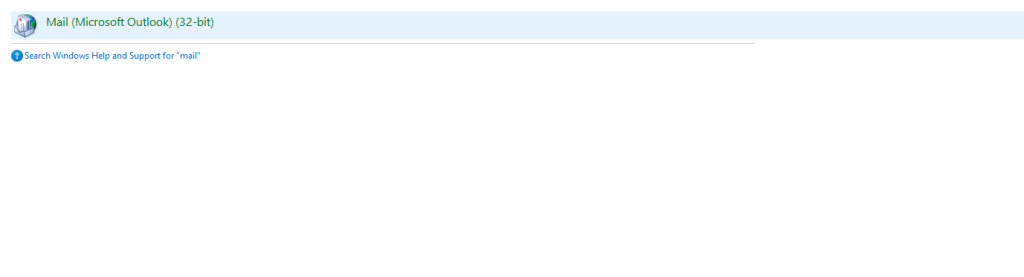
c. If you have other outlook profiles already, you can click Email accounts under Mail Setup. If
you do not have any account, click Add Profile and you can give it a random name then you
proceed.
d. Under Account Settings, Click New and Select Manual Setup or additional server types.
e. Choose POP or IMAP as the account type.
f. Fill it the User, Server and Login Information.


a. User Information:
i. Name: eg. John or My Company Sales.
ii. Email: The Email that you want to login to.


b. Server Information:
i. Account Type: Select IMAP
ii. Incoming Server: mail.mycompany.co.zw. Replace mycompany.co.zw with your actual web address or domain name eg. mail.vertico.co.zw
iii. Outgoing Server: mail.mycompany.co.zw. Replace mycompany.co.zw with your actual web address or domain name eg. mail.vertico.co.zw

c. Login Information: Enter the login details of the email that you want to login.


i. Username: The Email that you want to login to.
ii. The password you created in Section 2.3.
g. Click more settings and navigate to the Outgoing Server Tab.
h. Click my outgoing server (SMTP) requires authentication and move on to the Advanced Tab.
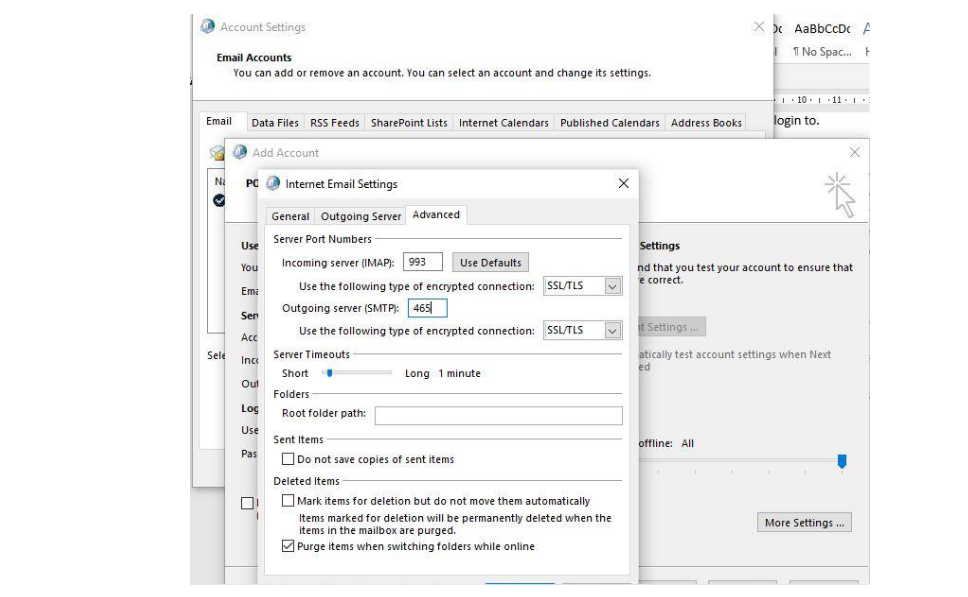
i. Under the Advanced tab:
a. Change Incoming Server IMAP Port to 993 and change the encryption type to SSL.
b. Change the Outgoing Server (SMTP) to 465 and change the encryption type to SSL.
c. Make sure the configurations are correct and click OK to save. (Check Screenshot
Below.

d. Click next, the Mail Client will connect to the server and 2 green checks will be
outpued if everything is correct, just click finish and that’s it.

What are your Feelings

Share This Article :

  • Facebook
  • X
  • LinkedIn
  • Pinterest
Still stuck? How can we help?

How can we help?

Updated on October 4, 2025
How to Troubleshoot OutlookEmail Setup on Outlook Mobile

Copyright © 2026 Vertico Solutions Private Limited - All Rights Reserved.

  • Domains
  • Web & Email Hosting
    • Web & Email Hosting
    • Personalized Emails
    • Web Hosting & Maintenance
    • Reseller Hosting
    • Cloud Hosting
      • Linux VPS
      • Storage
  • Web Development
  • Online Marketing
    • Social Media Marketing
    • Social Media Management
    • Search Engine Optimization
  • About
    • Company Overview
    • Customer Reviews
    • Terms & Conditions
    • Fair Use Policy (FUP) for Hosting Services
    • Privacy Policy
  • Resources
    • Documentation / Knowledge Base
    • Frequently Asked Questions
    • Tips & Updates
  • Support
Account Login →
Facebook Instagram