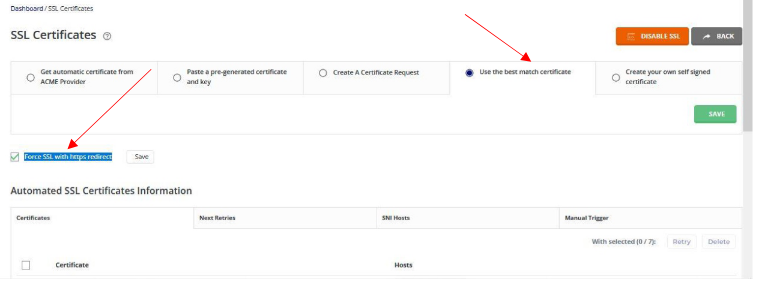
Our hosting system issues free ssl certificates (Using Let’s Encrypt) as soon as accounts are created. It also runs auto certificate renewal when they expire. However, errors may occur during the processes hence manual input will be required. You can check status of your certificates, issue new certificates or Force redirect to hps:// using the following steps;
a. Login to Control Panel dashboard.
b. From the Dashboard – under Account Manager open SSL Certificates.
c. The first setting under SSL Certificates should be set to Use the Best Match Certificate.
d. If there is no certificate installed, Select Get Automatic Certificate from ACME Provider.
e. Tick the check box on Force SSL with https redirect and click save. (Always make sure the checkbox is checked since this option is not automatic).
f. That’s it, your website will become secure within 5 minutes after this.